A few of the sensor nodes are battery powered so it is important to know if they have stopped transmitting. My previous system (which is still feeding openHAB) tracks last seen time stamp. In openHAB you have to set an item and a rule to handle that. This is one of the items at the bottom of this post that is required to remove my reliance on DomotiGa.
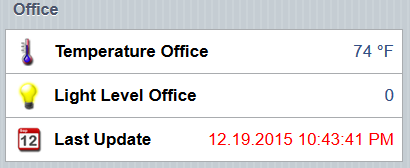
All this requires is one item to store the time stamp and a rule to update it whenever the sensor item receives a change. The only catch in my case is if the new value is the same as the current, it seems it is not triggered as an update. I am not sure if it is DomotiGa not sending or openHAB not triggering. So during the night I don’t get as many updates. It’s fine for now because when I setup a JeeNode to MQTT bridge, I can have that trigger the time stamp regardless if there is a sensor value change.
Items
DateTime office_lastupdate "Last Update [%1$tm.%1$td.%1$tY %1$tr]"You can use this site to help you format the datetime to suit your needs.
http://docs.oracle.com/javase/6/docs/api/java/util/Formatter.html
Rule
rule "Last Update Office"
when
        Item office_lightlevel received update or
        Item office_temp received update or
        Item window_office received update
then
        office_lastupdate.postUpdate(new DateTimeType())
end
Sitemap
Text item=office_lastupdate valuecolor=[office_lastupdate>300="red",>240="purple",>120="orange",>0="green",<0 data-blogger-escaped-code="" data-blogger-escaped-red="">Using the value color option you can quickly at a glance look at the time since update based on the color. Just adjust the values in seconds.
Reference
https://community.openhab.org/t/show-date-time-of-last-sensor-update/2114/9